
How it works
Tackora is a Kanban board for coding agents. Every ticket is one Claude Code session: the real CLI running in a terminal inside the ticket. The board shows what each agent is doing, and moves the cards as the work progresses.
This page describes the design. What's built so far is in Status.
The board
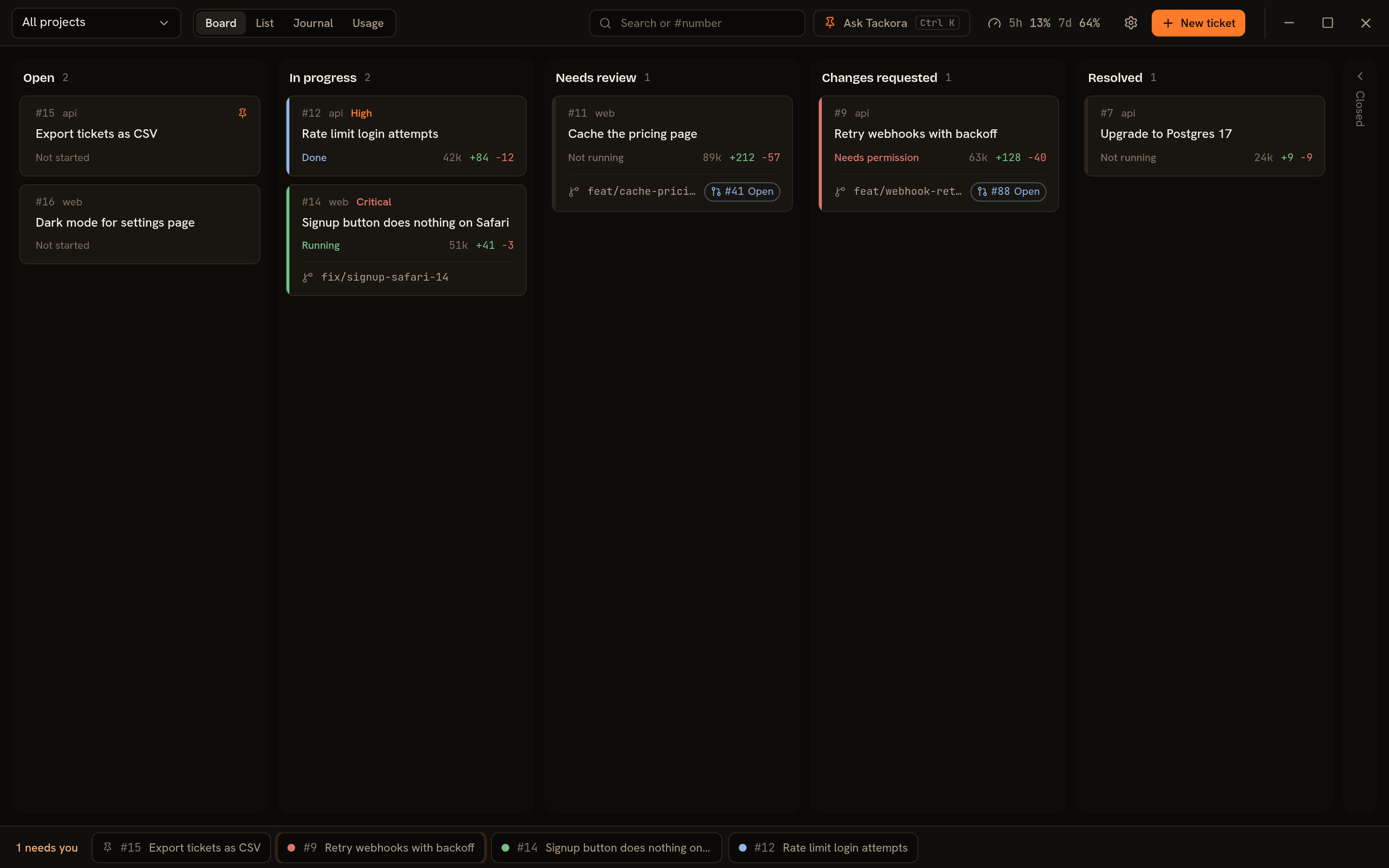
Tickets are cards in five columns: Open, In progress, Needs review, Changes requested and Resolved. Closed tickets are hidden. The same tickets are also a filterable list, and a journal of what happened each day.
Each card has two pieces of information:
- Its column: where the work stands.
- Its agent badge: what the agent is doing right now.
| Badge | Meaning |
|---|---|
| Running | The agent is working on your last prompt. |
| Done | The agent finished its turn and is idle at its prompt. Reply whenever you like. |
| Needs permission | The agent is blocked, asking to run a command or edit a file. This is the only state that counts as "needs you". |
| Not running | No terminal is open. Opening the ticket resumes the session. |
When an agent is Done or Needs permission while Tackora is in the background, you get a desktop notification.
The sidebar's Active list shows every ticket whose agent is working or waiting, with the ones that need you first, so you can jump between agents without going back to the board. Pin any ticket (the pin button next to its title) to keep it under Pinned.
New to Tackora? A Getting started checklist above the board walks you through adding a project, creating and starting a ticket, and trying Ctrl+K. Each step ticks itself off as you do it.
Cards move on their own
| When | The card moves to |
|---|---|
| You send the agent its first prompt | In progress |
| You submit for review and the pull request opens | Needs review |
| A reviewer requests changes on the pull request | Changes requested |
| The agent starts working on those changes | In progress |
| The pull request is merged, in Tackora or on GitHub | Resolved (the worktree is removed) |
| You commit with Finish ticked (direct mode) | Resolved |
You can always drag a card yourself. Dragging to Needs review submits it for review, and dragging to Resolved merges it (Tackora asks first). Other moves just change the column.
Tickets are sessions
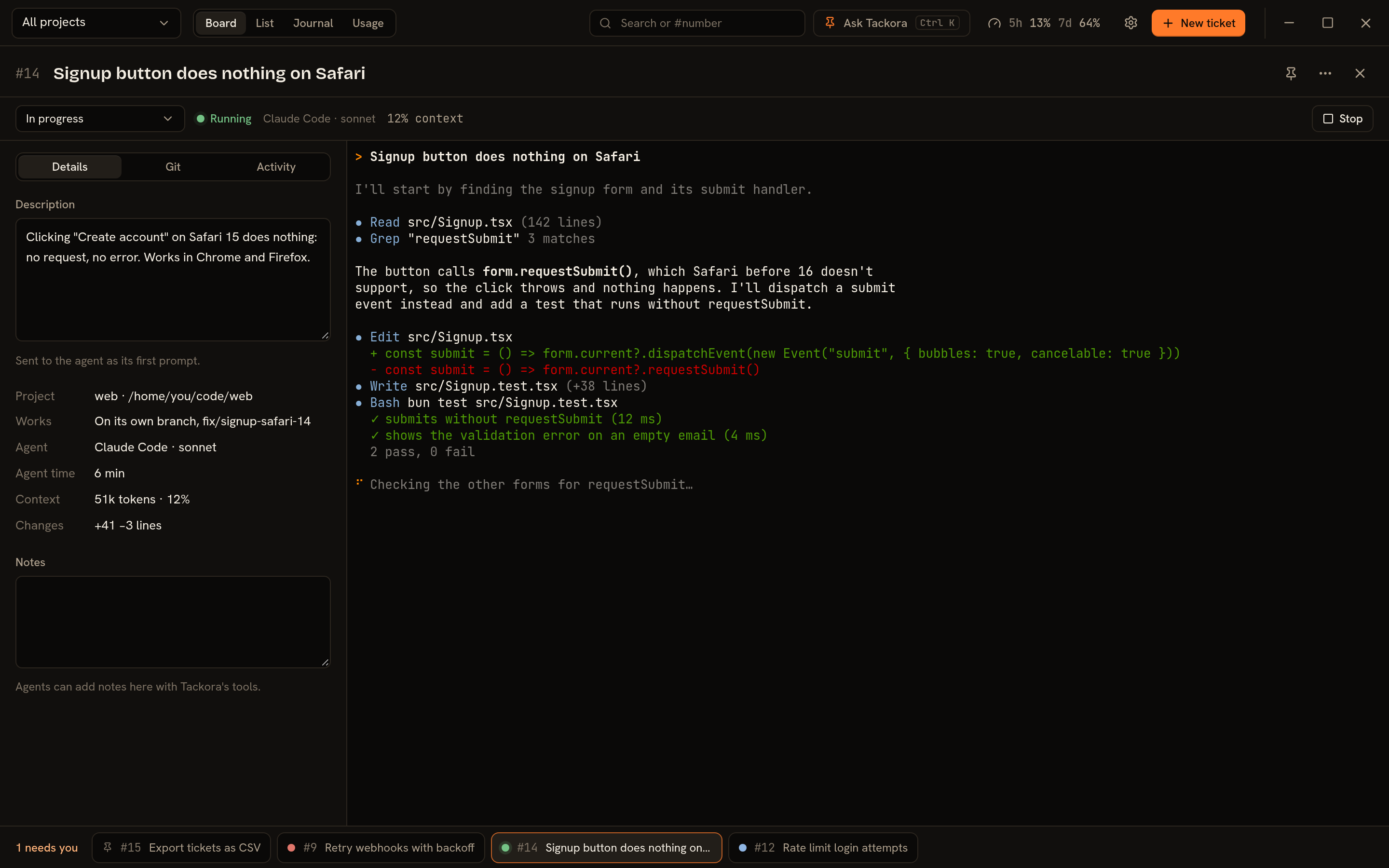
Starting a ticket starts its agent session. Tackora chooses the session's ID before the agent starts, so every session is tied to its ticket exactly. Reopening the ticket later, even after restarting Tackora, resumes the same session with its full history.
A session starts with claude --session-id <id> and resumes with claude --resume <id>.
When you start a ticket you choose the model, the effort level and the permission mode. Defaults come from settings. After that, change them inside Claude as usual; the ticket shows what's actually in use. Start over begins a new session and keeps the old one's agent time in the ticket's history.
Have a quick question that isn't really a task? Create a quick ticket with just a prompt.
Direct or worktree
Each ticket runs in one of two ways. Direct is the default, and each project can set its own default.
| Direct (default) | Worktree | |
|---|---|---|
| Where the agent works | The project folder, on whatever branch is checked out (e.g. main) | A separate folder with a new branch for this ticket |
| Several tickets on one project at once | One running at a time, so two agents don't edit the same files | Yes |
| When you're done | Commit, optionally push, and tick Finish to resolve | Submit for review opens a pull request. Merging it resolves the ticket. |
Worktree branches are named from the ticket, like fix/login-throttle or feat/export-csv. You can edit the name and the base branch when you create the ticket.
Ask Tackora
Press Ctrl+K and type what you want in plain words:
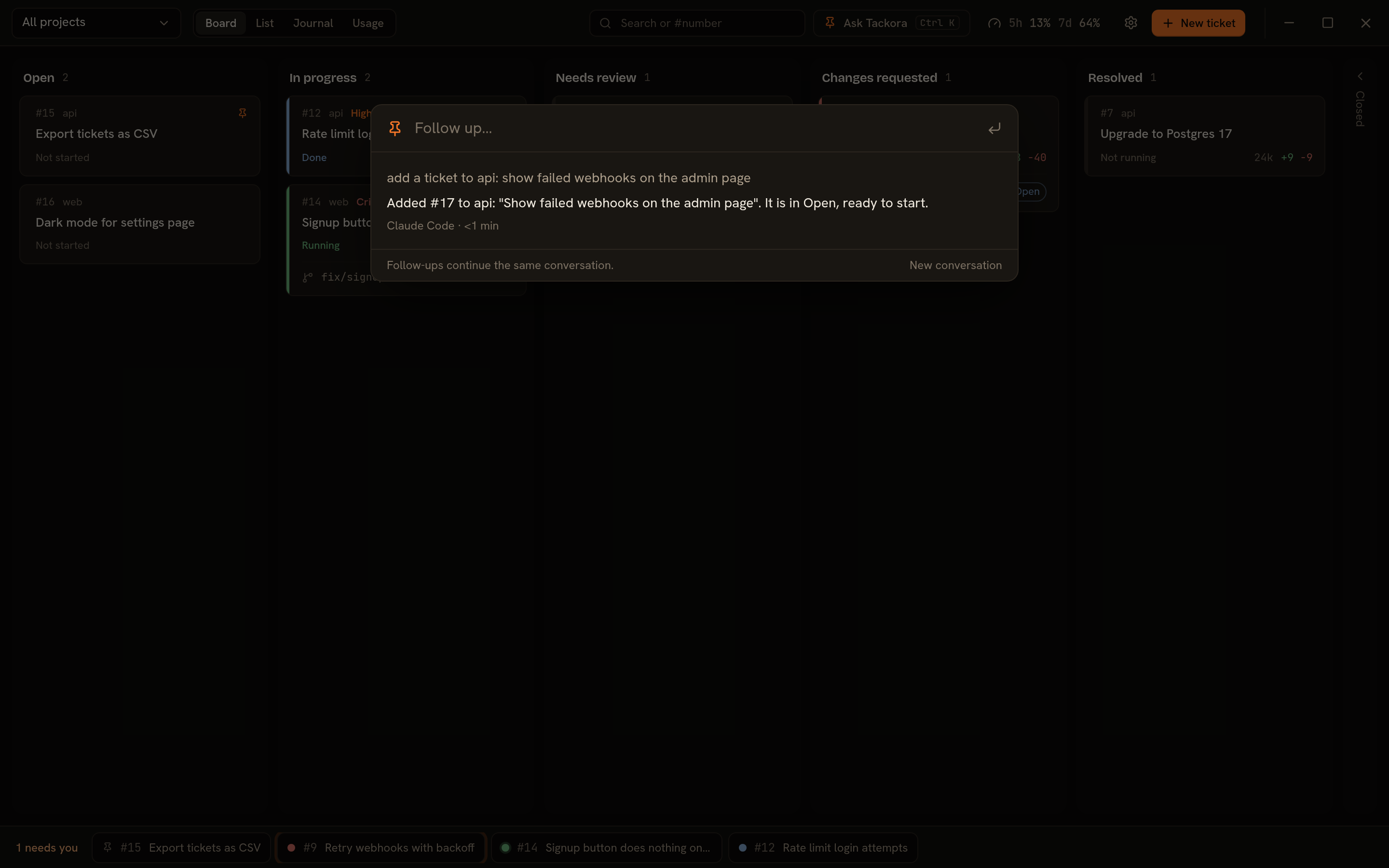
- "Clone anas1412/api and add it as a project"
- "Add a ticket to web: the signup button does nothing on Safari"
- "What's waiting for me?"
- "Move all the docs tickets in api to Closed"
Tackora doesn't have its own AI. It gives Claude Code a set of Tackora tools: list and create projects and tickets, edit them, move cards, start sessions. The agent then does what you asked and replies under the command bar, and the cards it changed are highlighted. Press Continue to follow up.
Agents working on tickets get the same tools. In any ticket's terminal you can say "add a follow-up ticket for the signup form", and an agent can file a ticket itself when it spots another problem. Every change records who made it (you, the command bar, or the agent on ticket #7).
Anything destructive or that touches Git waits for you: deleting, removing a project, submitting for review, merging, or changing more than five tickets at once. Tackora shows what's being asked and who's asking, and nothing happens until you click Allow.
Claude Code
When Tackora starts, it checks that claude is on your PATH and signed in. If not, it shows a setup screen with the install or sign-in command and a Check again button, and nothing else.
Usage
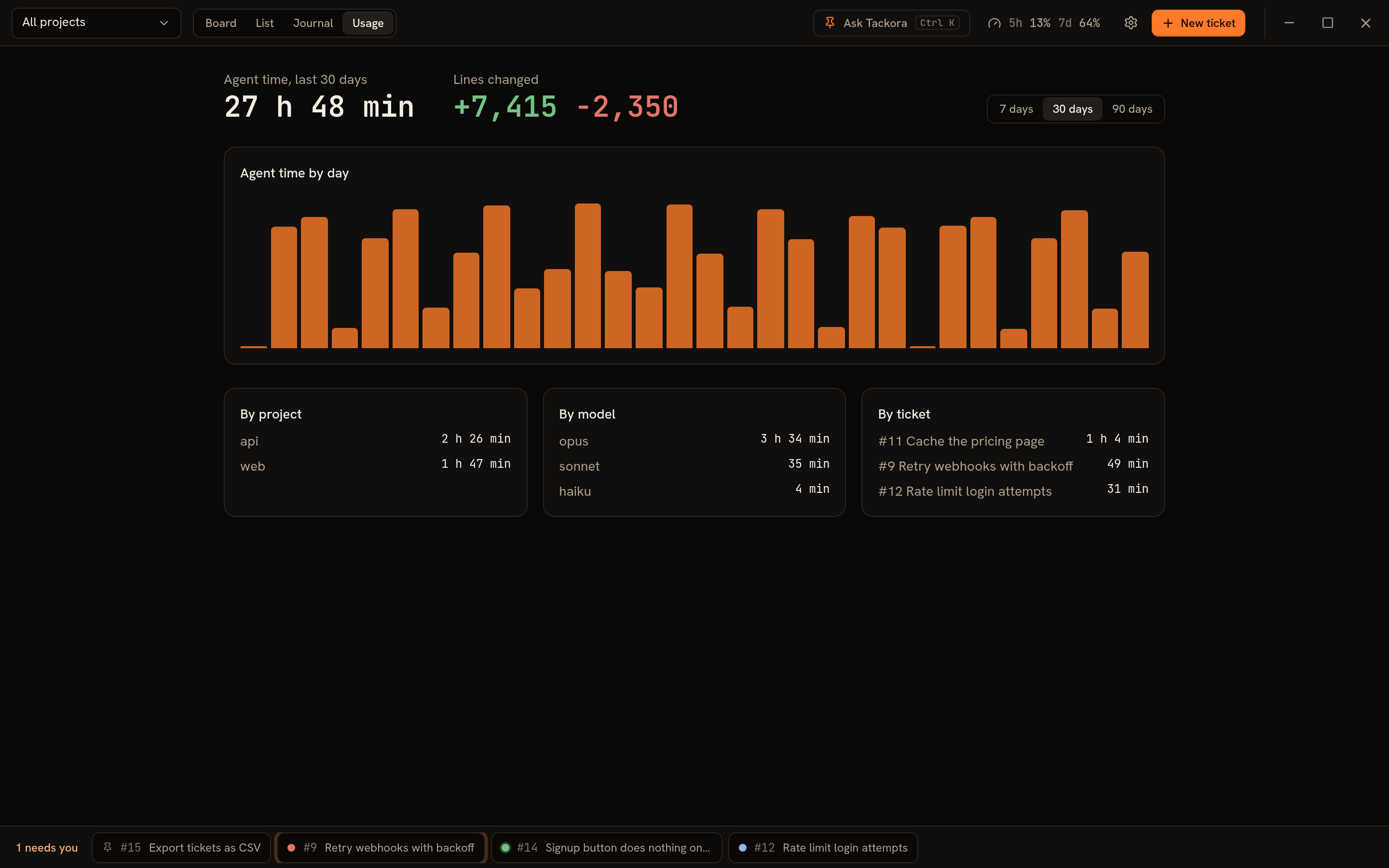
Tackora is for Claude plans (Pro, Max, Team, Enterprise), so it shows what Claude itself reports and doesn't estimate money:
- Plan limits: your 5-hour and 7-day usage and when each resets, in the top bar. The usage popover also shows the account, organization and plan you're signed in with.
- Per ticket: the agent's state from Claude's hooks, and from its status line the tokens in the session's context, the lines it changed and the time it spent working.
- Usage page: agent time and lines changed per day, project, model and ticket.
Status
| Part | State |
|---|---|
| Embedded terminal, Linux and Windows | Built · tested in CI on both |
| Agent detection and setup screen | Built |
| Projects, tickets, Kanban board, list, journal | Built |
| Tickets as sessions, agent badges, notifications | Built · tested end to end on Linux |
| Direct and worktree modes | Built · tested end to end on Linux |
| Automatic card moves, submit for review, merge | Built |
| Plan limits, agent time, lines changed | Built |
| Ask Tackora (command bar, agent tools) | Built · tested end to end |
| Installers (AppImage, .deb, .rpm, Windows setup) | Built by CI and on each release tag |
| Windows, on a real machine | Not yet tested by hand |
| Auto-update (Windows, AppImage; package installs are told) | Built |
| Windows code signing | Not yet |